
Quartz for Apple
Make room.
Find your focus.
A thoughtful timer for iPhone, iPad, Mac and Apple Watch. Structure a session, follow your flow and see the work add up.


A rhythm for the work
Some days need structure.
Others need space.
Choose a timer that suits the session. Set your Pomodoro focus and break lengths before starting, with no upgrade required.
Pomodoro
Work toward a clear finish, then take a short or long break. A repeatable rhythm for work you want to give a little structure.
Free Roam
Start without choosing an end time. The timer counts up while you work, so an open-ended session still has a record.
Flowmodoro
Keep going while you’re in the flow. When you finish, take the break your focus earned—or skip it and move on.
From intention to reflection
Give the time
some meaning.
Keep the task beside the timer, then return to a clear record of your work. These everyday tools are included for free.
- Tasks with context
- Create a task, add notes and attach it to a work session. Edit your list and mark work complete as you go.
- A History you can return to
- Review recorded sessions by day, with their duration, status and the task you worked on.
- Progress, without guesswork
- Review core Stats across Today, Week, Month and Year, including focus time and your current streak. Pro adds Insights and Custom dates.
One app, considered for each screen
From your desk
to your wrist.
iPhone
A session within reach.
Move between your timer, tasks and recorded progress in a compact layout. Start small, take a break and pick the next thing to work on.
iPad
More room to see your day.
A sidebar beside your content at wider sizes gives your timer, tasks and progress room to breathe.
Mac
Your desk. Your way.
Use the full app for timers, tasks and progress, or keep session controls in the menu bar. Choose a recent task, start a mode and pause, resume or finish your session.
Keyboard commands and optional Open at Login keep Quartz close to your routine. Flowmodoro retains its Pro requirement.
Apple Watch
A small next step, on your wrist.
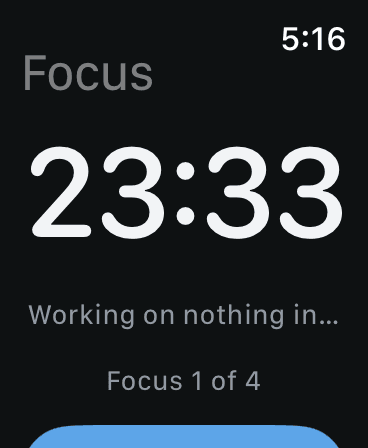
Start a session, pause or resume, finish, or confirm a change of mode. For Pro Flowmodoro, take or skip your earned break.
Apple Watch works with your paired iPhone.
Part of your day
Less reaching.
More staying with it.
Useful glances and familiar Apple controls keep the timer nearby while your attention stays on the work.
- Widgets & watch complications
- See a countdown from your Home Screen or Lock Screen, or use a Watch complication or Smart Stack widget. Supported larger Home Screen widgets add pause and resume. Countdown widgets do not show Free Roam or Flow work.
- Live Activities
- See remaining or elapsed session time on the iPhone Lock Screen and Dynamic Island. Pause or resume from the expanded Dynamic Island on supported devices.
- Siri & Shortcuts—available now
- Start focus, control a session and check its state with existing actions. These are separate from the planned Siri AI integration.
- Focus Filters
- Prepare a focus duration for an Apple Focus. Quartz is ready with that duration when you choose to start.
Your records, your choice
Keep what matters
together.
No ads. No Quartz account required. Use Quartz on your device, with optional free private iCloud sync for supported records.
Optional iCloud sync
Sessions, tasks, settings and saved presets can sync within your Apple devices.
Choose the setting on each iPhone, iPad or Mac. A change takes effect next launch.
A few things stay local.
Reminders stay on each device. Record sync is separate from controlling a live timer, and does not connect to Quartz on Android.
Quartz Pro
More room for
your own rhythm.
Keep the everyday essentials. Add more flexibility when you want it.
- Follow your flow. Understand your patterns.
- Flowmodoro, deeper Insights, period comparisons and Custom dates in Stats and History.
- Make the setup yours.
- Premium starters, saved presets, sequences, four more gemstone themes and reminders.
- Stay a little longer.
- Extend running or paused Pomodoro focus sessions and breaks. Pre-start durations, ordinary controls and optional sync stay free.
Looking ahead
Coming soon
Apple
Siri AI integration
For Quartz on Apple devices.
iPhone Duo native experience
A Quartz experience designed for iPhone Duo.
Planned for Quartz. These additions are not available in the current apps.
Available now
Find your focus.
Start with Pomodoro and Free Roam. Explore more with Quartz Pro.

Apple and Android purchases are separate.